

How to fix MySQL server not starting in the XAMPP control panel. The logs will most likely say unexpected shutdown or “Index for table ‘.\mysql\user’ is corrupt; try to repair it”.
This has happened to me on a few occasions with XAMPP, seemingly caused by stopping the MySQL server in the control panel.
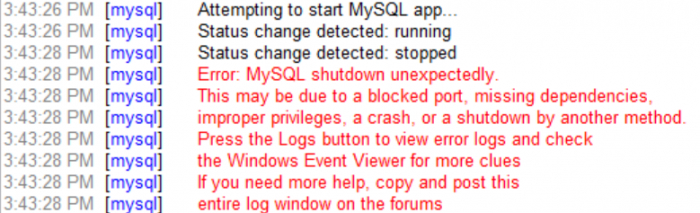
This was my error log upon trying to start the MySQL server:
The fix
Fixing the MySQL server not starting in XAMPP is done by reverting back the data files pre-issue.
Navigate to your XAMPP MySQL directory (C:\xampp\mysql).
Create a new folder called FIX_BACKUP.
Copy C:\xampp\mysql\backup and C:\xampp\mysql\data into C:\xampp\mysql\FIX_BACKUP.
Paste the contents of C:\xampp\mysql\backup into C:\xampp\mysql\data overwriting all the files.
Finally copy the ibdata1 file from C:\xampp\mysql\FIX_BACKUP\data into C:\xampp\mysql\data overwriting the file.
Your MySQL server should now start in the XAMPP control panel.


